Find it fast.
Search, filter, paste. Back to your app in seconds.
A little more memory for your Mac.
Copy once. Find it later. A clipboard history manager for macOS that keeps links, words and images within reach.
Fresh from the kitchen: the 1.6 releases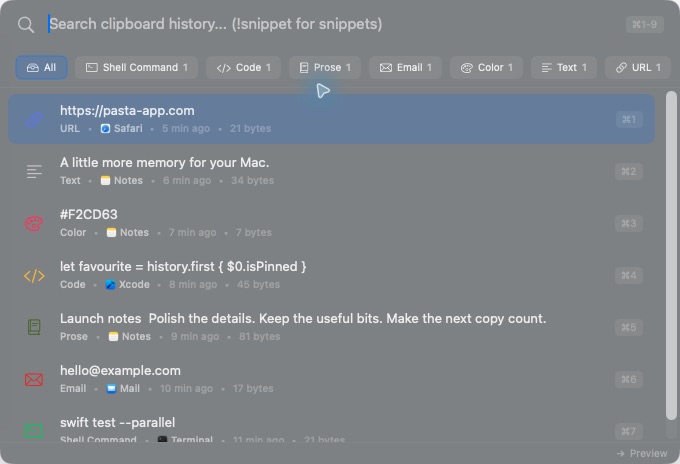
Lives on your Mac
Ready at ⌃ ⌘ V
No account needed
Yours to keep
Everything you copy, ready for another go.
Search, filter, paste. Back to your app in seconds.
Clear previews for links, images, code and colours.
Pin the good stuff. Paste plain text or several clips at once.
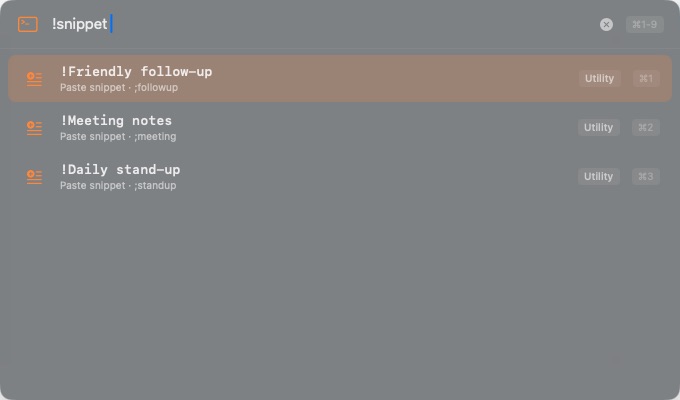
Save replies as snippets. Dates and placeholders fill in as you paste.
Type !snippet. Pick. Paste.
Native, quick and always in your menu bar.
Your Mac and iPhone history, together. iCloud sync is opt-in.
Bring history from your old clipboard app. Export whenever you like.
Saved on your Mac by default. Sensitive clipboard items are skipped by default. iCloud sync, approved Tailnet Sync pairings, crash reports and analytics stay off until you opt in.
Read the privacy detailsLocal by default.
Open source, always.
Recent favourites. A peek at what’s next.
Highlights from September 2026
Automatic iCloud receiving on Mac, with privacy-safe sync diagnostics.
A snippet picker, smart placeholders and optional keyword expansion.
Roadmap, without the promises
Pair personal Macs across iCloud accounts using Tailscale. This isn’t available yet.
More real-device checks for sync, offline recovery and app updates.
Follow the reliability workPlans can change. No release dates until they’re ready.
Have a suggestion?
Free. Native. Ready when you are.
Free. Requires macOS 14.0 (Sonoma) or later.